My Search for a Family Tree Maker for Mac Replacement.
Part 2
I decided to go back to looking at Mac specific products. The difficulties of working with C: and F: drives and lack of adequately accessing my file system was too frustrating.
What I didn’t mention on my blog was that I only used it for three of the dozen or so family trees I manage. I liked a lot about it but the surname issue I mentioned before and the cumbersome process of associating my source and citations to a fact, event, or location that I couldn’t seem to overcome caused me to continue working with Family Tree Maker for Mac 3 with my larger trees and not convert them to Heredis. I tried working with it again in earnest and decided I might use it, but I thought there must be something I like better.
Gramps
Gramps is an open source program for managing genealogical data. There were quite a few things about it that I liked. (No cost is good.) I liked how you could focus upon an individual and not be burdened by family unit information. The way you could enter relationships that didn’t include marriage yet did include children was nice. However, the proof of the pudding was how it handled entering source/citation/textual data then associating it to multiple facts involving multiple individuals. Again, I found it cumbersome. I only gave it a few hours and I think I might have figured out better processes to handle it, but I decided to continue and research some other products.
Mac Family Tree
I had version 5.5.5 several years ago and see that they have updated it several times since. The latest is Mac Family Tree 7. I downloaded their demo version, 7.6.2. It is supposedly the same as their paid version except you can’t import, can’t save, and can’t print. So, I began putting a tree together using my process for documenting a source and then associating it was individuals and their facts and/or events. Not bad — certainly better than Gramps and Heredis and much simpler than RootsMagic. I decided that it was definitely a contender, but I wanted to continue.
Reunion
One of the many websites I looked indicated that they thought Reunion was the best. I had Reunion 9 a number of years ago and liked it. I used it until I went to Family Tree Maker for Mac (FTM4M) because I wanted the replication to Ancestry Trees that FTM4M allowed. Their new version, Reunion 11, has a free evaluation version that allows for 50 people, no import or export, watermarked reports and some other limited features. Luckily, it allowed enough functionality for me to test my work processes. Wow – I was impressed.
I really loved how you can put almost anything you want on the left side of the screen, including sources. Then you can enter your facts, events, or notes and drag and drop the appropriate source citation to the fact. It was a really a smooth process.
Reunion, like many other systems, doesn’t deal well with multiple names. For example, my grandfather was born Clifford Durwood Brown. He went by Richard Durand for many years (married and had two children) and then changed his name to Richard Earl Brown. RootsMagic handles that really well. Most other genealogy programs don’t. Many require you to pick one name as the individual’s name then make aliases for the other names. Reunion has a few suggestions. In the case of my grandfather, I could use Richard Earl Brown because that was his name at his death. I could also use Richard Durand because that is the surname that most of his children were raised with the Durand surname. In either case, Clifford Brown would be an alias or “AKA.” It just doesn’t seem right to me to make someone’s birth name an alias. They mention the problems with that as the alias names don’t show up in the indexes reports.
They also suggest using brackets to for the alias names. For example, my grandfather would be: [Clifford Durwood] Richard Earl for his first and middle name and [Durand] Brown for his surname. It just seems cumbersome confusing. I wish they did what Roots Magic does where both names are entered and are visible in the indexes with the aliases identified by a prefix of “+.”
I wish that Roots Magic, or Legacy Family Tree for that matter, made an actual Mac product. Until they do, I’m going to use Reunion and hope they can improve their multiple name handling issues cause the rest of Reunion seems to be just what I’m looking for.
My Search for a Family Tree Maker for Mac 3 Replacement
Part 1 of 2
Legacy Family Tree
I have long recommended Legacy Family Tree to my friends that have Windows. Their product only operates in a Windows environment. On a Mac that means you need to run Parallels, CrossOver, VMWare, or something similar that allows you to run Windows programs on a Mac. I used VMWare for a year or two when I switched to Mac. It allowed me to run all of my legacy Windows programs on my new Mac while I converted to using Mac programs. That way I didn’t have to replace all of my software all at once. I upgraded my Mac to a newer OS (operating system) a couple years later and found that my version of VMWare didn’t run on that updated OS. I had to do a paid upgrade of VMWare to continue using it or drop it. I only had one Windows based program remaining and buying a new Mac version of that program was less expensive than upgrading VMWare. If you have a Mac, have a Windows running program, and are used to Windows programs, I still recommend Legacy Family Tree as a solid solution to your Family Tree Maker for Mac dilemma.
Roots Magic 7
The president of my local chapter of the Maine Genealogical Society posted a sales notice regarding Roots Magic. I have long heard good things about Roots Magic. I went to their site and saw it was on sale for $20 instead of the regular $44.90 price – A sale too good to pass up. They also indicated they have a new Mac Version. I’m not big on “free” versions of software, so I bought the full version, installed it, and ran it. I quickly found out it isn’t an actual Mac version; rather it uses CrossOver as a Windows environment emulator. As such, it works like Windows software and not like Mac software.
I opened one of my smaller trees in Family Tree Maker for Mac and exported to a GED file. I then imported it into RootsMagic 7. Then I walked through each of the menu options and looked at what my options were. Some of the options I really liked, such as identifying the married name for a woman. Some of the options I didn’t understand, such as “general source, an individual source, and a family source. Some of my work didn’t import as I expected, for example my “to do” tasks, but I expected that. Those minor shortages were overcome by the some of the really cool features, such as generating the files for a website and creating a shareable CD.
As I expected much of my data was all over the place. I had descriptions in locations and many other problems. All in all, it will take a long time for me to clean up all of my files, sources, places, and individuals — A very long time.
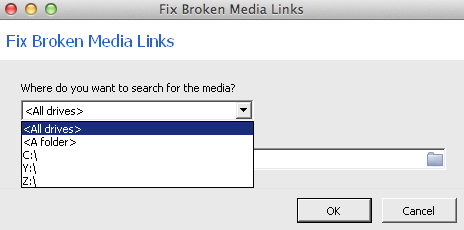
I was looking at the Media gallery and under tools, found “fix broken media links.” I found the disconcerting Windows type of file system. The prompt didn’t allow me to select any directories so search so I had to search an entire drive. Not cool. I let it run for several hours and it seemed to have locked up. I gave up and hit cancel. It did give me the option to import what it had found thus far. Therefore, I was able to import 80 of the 133 media items that I had in Family Tree Maker for Mac. That said, I’m not positive if the 53 missing items were because of RootsMagic or because my Family Tree Maker file had already started corrupting – Probably the latter.
I adjusted the fonts and other settings to make it better for me and used it for a couple days. Roots Magic is a complicated program and I just couldn’t get the hang of it. There were times I felt like the tail was wagging the dog. That is to say, it seemed that the software was driving what I needed to do rather than my workflow being able to be documented easily by the software. Using Roots Magic really helped me understand how I like to work.
Painting by Henry Thomas Alken
[Public domain]
As I mentioned in a previous blog posting (Jump Hunting and the Maine Register), it is like jump-hunting ducks. I decide where I’m going to go hunting, go there, and “bag” the available information. Then I clean it, cook it and eat it – analyze the information, extract the information, and incorporate it into my family history. I don’t like to eat things I don’t know where they came from. Likewise, I try to have every fact, event, and story in my family history clearly documented as to the source.
The bottom line is that after a couple days of working with Roots Magic 7, I just could not learn to love it. I can definitely see why many others use it, but I just couldn’t fit my jump shooting stratagy into it’s use. Between the complexity of the software and the Windows interface, I decided to abandon my Roots Magic test and begin my search for a Family Tree Maker for Mac replacement once again.
To be continued….
[By the way, if you are interested in converting from Family Tree Maker to Roots Magic 7 , now is the time to do it with their special FTM to RM offer of only $20.]
We did not have a television while I was growing up. I remember listening to the radio a lot when I was young. When I was in the second grade (1957), we lived in upstairs of a bakery in downtown Anoka, Minnesota. Next-door was a bar (beer joint) that had a television. Actually, they had one of the earliest color televisions. I remember my grandmother, Donna, taking me there to watch special events. I specifically remember watching the Tournament of Roses Parade and the Rose Bowl in color there. It was amazing.
We did not have our own television until I was in the fifth grade (about 1960) and were living in Spring Lake Park, Minnesota. It was a black and white TV. I remember watching morning cartoons a lot and my favorite TV show at the time was “Have Gun Will Travel.” At the time, I thought Richard Boone and my grandfather, Dick, look a lot alike. I think they had the same kind of mustache.
In 1961, my mother married Budgar and in 1962 we moved to North Minneapolis (1502 Fremont Ave No.). While there, Budgar purchased a color television. “Walt Disney’s Wonderful World of Color” and “Route 66” were my favorite television programs then (although I still loved “Have Gun Will Travel” but it was only in black and white). It was the first television I recall having a remote. I could change channels by clicking my cap gun (with a Paladin holster) – I guess TV remote was ultrasonic and the clicks of my cap gun made the TV change channels.
RCA Indian Head test pattern
About 1965, we, my mother, younger sister, and I, lived in Detroit for a short time. In Detroit, we had a weird television. Rather than the standard clicking channels, the TV had continuously tuning through the VHS band much like UHF channel selector did in those days. Between channels six and seven there were a multitude of things that could be received. FM radio stations were there along with amateur radio and some, as I recall, police/fire radio communications. It was a cool television and the only one I’ve ever seen with that type of tuner in the VHF band.
Television notes from other family members via Facebook:
My sisterGlennis says: “We got our 1st TV when I was 7… an RCA Victor. For many years we only had one channel, our own local channel 4 (then an NBC affiliate.) a second channel came in a few years later when they built a repeater for the Eugene ABC affiliate. Our second TV was also Black and White. We got a Magnavox color TV when I was a senior in high school. By then, we had three channels.”
Aunt Barbara says: “I think we got our first black and white TV in about 1949/1950. It was a gift from my Uncle Bob. We loved it and him too.”
My nephew Luke says, “We had a TV already when I came along. My first memory of television was color, a little 12″ or so screen with green backlit pushbuttons down the side of the screen for channel selection and a roller wheel for volume control. It was undoubtedly a Sony. We had it in Roseburg Oregon and I remember only two channels. My mother (Glennis) had a black and white TV after the divorce, a yellow plastic housed unit with a tiny little knob on the bottom right for on/off and volume control. This was in Eugene, I remember at least three channels.”
Sarah B Blackhurst is my most recent immigrant ancestor. Sarah was born in England, most likely in Sheffield, Yorkshire, about 1848 (I think Dec 1847). I use the 1900 Census for the basis of birthdates because it indicates the month and year of a person’s birth in addition to his or her age. In Sarah’s case, the Census reports her birth as Dec 1867 but her age as 42, which would place her as born in 1857[i]. Consequently, I only pull the month of her birth from the 1900 Census. I then use the 1850 Census, in which she is two years old, and derive a birth date of December 1847[ii].
The 1920 Census shows Sarah Blackhurst Barber’s arrival in 1850.
The 1850 Census also indicates that she was born in England and living in Detroit at the age 2 indicating an arrival before June 1850. Additionally, the 1920 Census indicates the date of her arrival as 1850[iii], so, I’m fairly sure of that she arrived in 1850. I haven’t found the family arriving in the United States in any immigration documents, so far but will continue searching.
Seventy-year-old Sarah is enumerated in the 1920 Census living in Manhattan, New York, New York[iv]. I have been unsuccessful finding a death record for Sarah thus far.
Further Action:
Find Sarah and family in immigration documents.
Endnotes
[i] 1900 Census (National Archives and Records Administration), Ancestry, https://www.Ancestry.com, Year: 1900; Census Place: Detroit Ward 4, Wayne, Michigan; Roll: T623_748; Page: 13B; Enumeration District: 36.
[ii] 1850 United States Federal Census, Family Search, Stephen Blackhurst – Auburn county, ward 4, Cayuga, New York, United States; citing family 1389, NARA microfilm publication M432 (Washington, D.C.: National Archives and Records Administration, n.d.). Accessed 24 November 2015. https://beta.familysearch.org/ark:/61903/1:1:MCT2-GRX.
[iii] 1920 Census, Ancestry, https://www.Ancestry.com, Manhattan Assembly District 13, New York, New York; Roll: T625_1209; Page: 24A; Enumeration District: 958;
[iv] 1920 Census, Ancestry, https://www.Ancestry.com, Manhattan Assembly District 13, New York, New York; Roll: T625_1209; Page: 24A; Enumeration District: 958; Image:.
Randall J. Seaver, in his blog Genea-Musings, suggested this topic.
James Robert Mannin (1867-1937) – Second Great Grand Uncle
I don’t know much about my second great grandfather John William Manning. I thought I might learn more by researching his son, my great grandmother’s (Mary Elizabeth Manning Brown) half brother James Robert Manning. I had many questions about “Bobby” as ‘grandma Brown called him. My great-aunt Delores wrote to me in 2005 regarding “uncle Bob” and mentioned he had moved to Washington State with his wife Martha. Uncle Bob had two sons, Grant & Herbert that she knew.[i]
Holding Township is Northwest of Saint Cloud
Saint Anna is in Avon Township just south of
Holding Township. Source: Google Maps
I had seen him in a couple censuses so I knew something of him and his life, but not too much. The earliest place I find a record for him is in the 1885 Minnesota Census[ii]. It shows him, along with is sisters Mary and (Phebe) Jane living near Saint Anna in Holding Township, Stearns County, Minnesota with their grandparents, Enoch and Menorvi (Minerva) Mannan (Mannin).
The 1895 Minnesota Census shows Enock (Enoch) and Minerva Mannin living in Township 134, Cass County, Minnesota. Living with them are Robert, his wife, and their two oldest children, Pearly and Earnest R Mannin[iii]. Neither the 1885 nor the 1895 Minnesota censuses provide relationship information. That is probably why many people associate Robert as being the child of Enoch and Minerva when Robert would be their grandson. That Robert is not Minerva’s child is evidenced by the 1900 Census that indicates Minerva’s had nine children, five of whom were still living[iv]. Her children would have included:
John William – Died in 1888. Isaac Wilson – Living
in 1900.Nancy Ann – Living in
1900.Meredith – Unknown – Presumed dead (No reverences to him
after 1870 Census) Sarah Jane – Living
in 1900.Mary Ermaline –
Living in 1900.Gresella – Died in 1897 Prudence – Living in
1900.Charlie – Unknown – Presumed dead (No references to him
after the Civil War).
By my logic, Robert could not have been one of Minerva and Enoch’s children. Therefore, there must be an error in the Family Search trees for Robert.
1900 – Had Robert and family still been living with Enoch and Minerva in 1900, the relationship would have been clearly identified. However, in 1900, Robert shows up as James R Mannin living as a farmer in Township 135, Cass County, Minnesota with is wife, Martha, and children. In 1900, Martha had had four children all of whom were living. They were:
Pearlie Mannin Daughter Born: Mar 1892.
Ernest R Mannin Son Born: Nov 1894
Minnie Mannin Daughter Born: Jul 1897
Nora M Mannin Daughter Born: March 1899
It is important to note that the wife and two eldest children have the same names and respective ages as in the 1895 Minnesota Census. This evidence helps establish that Robert Mannin was known as James R Mannin in 1900. We will also see that Robert James Mannin and James Robert Mannin, and parts thereof are used interchangeably throughout the years. In addition, Mannin and Manning are used interchangeably.
The 1905 Minnesota Census shows James R Mannin still in May Township, Cass County, Minnesota. He had been in the state for 21 years and in the enumeration district for 6 months. With him are is wife Martha and six children:[v]
Pearle age 13
Ernest R age 10
Minnie age 7
Nora M age 5
Clara age 4
Herbert age 1
The 1910 Census finds Robert J Mannin living in May Township, Cass County, Minnesota. Living with him are his wife and six children. It is interesting to note that Ernest R is E. Raymond in this census.[vi].
The 1920 Census find James Mannin with his wife Martha, his son Herbert, and another son, Frank (aged 7) still living in May Township. Also living with them is their daughter Nora, her husband Elde Wagner, and their son Arthur[vii].
James Mannin, Head, Owns Mortgaged, M, W, 53, M, Read, Write, Born Kentucky, Farmer, General Farm, Own Account
Martha Mannin, Wife, F, W, 49, M, read, write, Kentucky,
Herbert Mannin, Son, M, W, 15, S, attended school, Minnesota
Frank Mannin, Son, M, W, 7 4/12, S, Attended school, Minnesota
Elde Wagner, Son Law, M, W, 26, M, read, write, Minnesota, both parents Wisconsin, Farm Laborer, Working Out for wage.
Nora Wagner, Daughter, F, W, 20, M, read write, Minnesota,
Arthur Wagner, Grandson, M, W, 1-9/12, Minnesota
1930 – Sometime between 1920 and 1930, James Robert Mannin and family moved to Yakama, Washington where they are found in the 1930 Census[viii]. With James Robert are his wife Martha and his youngest son, 17 year-old Grant. I believe that Frank and Grant are the same child; however, I am unable to confirm/validate that assertion so far.
Then on Rootsweb I was able to find “Davis Family of England, Ohio & Minnesota & McGuire family of Virginia, Kentucky & Minnesota[ix]” which included James Robert Mannin and his pedigree. It says he died on 22 Dec 1937 in Yakima, Washington. It provided his mother’s name of Evelyn Brynard and his wife’s maiden name as Martha Jane McGuire. I don’t accept these as new facts, yet; however, I do accept them as clues for further research.
Actions:
Open a discussion on Family Search to move Robert under John William and make him a grandson to Enoch, not a son.
Continue researching James Robert Mannin’s parentage (particularly sources for his mother Evelyn Brynard)
Research James Robert Mannin’s wife, Martha Jane McGuire.
[iv] 1900 Census (National Archives and Records Administration), Ancestry.com, 1900 Census; Minnesota, Cass, Township 134, District 0048 Sheet 5.
[v] 1905 Minnesota State Census, Family Search, James R Mannin, May township, Cass, Minnesota; citing p. 1, line 17, State Library and Records Service, St.Paul; FHL microfilm 928,772. : accessed 20 November 2015). https://familysearch.org/ark:/61903/1:1:SPSF-L9Q.
[vi] 1910 Census (NARA), Ancestry.com, Year: 1910; Census Place: May, Cass, Minnesota; Roll: T624_693; Page: 9A; Enumeration District: 0013; FHL microfilm: 1374706. Record for Robert J Mannin.