Back to research – Elmer (of Georgia)

After all the work I put in regarding eliminating Family Tree Maker and looking at various products over the past couple weeks, it is good to get back working on actual genealogy projects again. To document this work, I am using Reunion 11 and am seeing how it works during extended research. So far, I am really pleased with it. I really like the way it allows me to create a source then go to my individuals, create events and facts and associate my sources with those events and facts. I still need to spend some time learning how to better use the logs, but I’m getting there.

Elmer (of Georgia) (1910-bef 2011)

Sometimes there just isn’t anything to find online. That is the case of Elmer (aka Tuggle). He was born in Georgia between 20 Aug 1910 and 27 Dec 1910.

One register I found him in indicates him to be 20 years old on 19 Aug 1931, inferring a birth between 20 Aug 1910 and 19 Aug 1911.[i] Another register I found him in indicates he was 29 years old on 27 December 1910, inferring a birth between 26 Dec 1909 and 27 Dec 1910[ii]. Consequently, I infer his birth between 20 Aug and 27 Dec 1910.
I know that Elmer was in Paulding County in 1931 and in Cobb County in 1939, but I don’t know much else about his life.

1940 Census shows Elmer’s wife widowed.

The 1940 Census indicates that his wife was widowed and living with her parents with the children[iii]; however, the 1945 Atlanta City Directory indicates he and his wife living together in Atlanta and that he was working for the Benton Transportation Company.[iv] This leads to more questions about Elmer and his life. Was he alive in 1945 or did the city directory erroneously carry Elmer and his wife for five years? Did Elmer and his wife reconcile for a while? Lots more to investigate.

Elmer’s death is unknown; however, the obituary for one of his sons indicates he preceded his son’s death in 2011.[v] I will need to further investigate each of Elmer’s children’s lives and see if I can better determine his death.

So, after exhausting my on-line resources, I need to try various other methods to find further information. First, I need to try a microfilm loan. When I lived in Smyrna, GA, I was able to get service copies of microfilm located at the Univ. of Georgia at Augusta for another project I was working on. I will try to order another set of microfilm and see if they will share it with me now that I live in Maine. I hope so. In addition, there are possibly court records in Paulding County, Georgia, which may shed some light onto this family research. I’ve contacted the Clerk of Court regarding that. There are also some other newspaper articles available through Genealogy Bank. I plan to switch to them next year, so I will put this into my queue to work on it once I make the shift.

Future actions:

Trace Elmer’s children’s lives, particularly their obituaries.
Track down documents from Paulding County in 1931.
Track down documents from Cobb County in 1939.
Create family tree islands for all of the families in Paulding with the same Surname and seek to determine if Elmer/Tuggle fits into one of those families.

 Endnotes

[i] Georgia, Central Register of Convicts, 1817-1976, Page 18 of 564 – ___, Elmer, Ancestry.com.

[ii] Georgia, Central Register of Convicts, 1817-1976, 1936-1942, Cobb, Georgia, USA, Image 95 of 642, Line 16, Ancestry.
[iii] “1940 United States Federal Census,” Name: Online publication – Provo, UT, USA: Ancestry.com Operations, Inc., 2012.Original data – United States of America, Bureau of the Census. Sixteenth Census of the United States, 1940. Washington, D.C.: National Archives and Records Administration, 1940. T627; Ancestry.com.
[iv] “City Directory – Atlanta,” 1945.
    ____, Elmer (Lura) driver Benton Trans Co. r553 Washn SW

[v] “Daily Citizen, Dalton, Georgia (online archive).”

 
The surname for this posting has been intentionally suppressed.
Posted in Adair | Leave a comment

Family Tree Maker for Mac Replacement Search – Part 2

My Search for a Family Tree Maker for Mac Replacement.

Part 2

I decided to go back to looking at Mac specific products. The difficulties of working with C: and F: drives and lack of adequately accessing my file system was too frustrating.

Heredis

I blogged about Heredis in 2012 (See: Heredis 2.1.0 (Mac Version))
and again last June (Heredis 2015).
What I didn’t mention on my blog was that I only used it for three of the dozen or so family trees I manage. I liked a lot about it but the surname issue I mentioned before and the cumbersome process of associating my source and citations to a fact, event, or location that I couldn’t seem to overcome caused me to continue working with Family Tree Maker for Mac 3 with my larger trees and not convert them to Heredis. I tried working with it again in earnest and decided I might use it, but I thought there must be something I like better.

Gramps

Gramps is an open source program for managing genealogical data. There were quite a few things about it that I liked. (No cost is good.) I liked how you could focus upon an individual and not be burdened by family unit information. The way you could enter relationships that didn’t include marriage yet did include children was nice. However, the proof of the pudding was how it handled entering source/citation/textual data then associating it to multiple facts involving multiple individuals. Again, I found it cumbersome. I only gave it a few hours and I think I might have figured out better processes to handle it, but I decided to continue and research some other products.

Mac Family Tree

I had version 5.5.5 several years ago and see that they have updated it several times since. The latest is Mac Family Tree 7. I downloaded their demo version, 7.6.2. It is supposedly the same as their paid version except you can’t import, can’t save, and can’t print. So, I began putting a tree together using my process for documenting a source and then associating it was individuals and their facts and/or events. Not bad — certainly better than Gramps and Heredis and much simpler than RootsMagic. I decided that it was definitely a contender, but I wanted to continue.

Reunion

One of the many websites I looked indicated that they thought Reunion was the best. I had Reunion 9 a number of years ago and liked it. I used it until I went to Family Tree Maker for Mac (FTM4M) because I wanted the replication to Ancestry Trees that FTM4M allowed. Their new version, Reunion 11, has a free evaluation version that allows for 50 people, no import or export, watermarked reports and some other limited features. Luckily, it allowed enough functionality for me to test my work processes. Wow – I was impressed.

I really loved how you can put almost anything you want on the left side of the screen, including sources. Then you can enter your facts, events, or notes and drag and drop the appropriate source citation to the fact. It was a really a smooth process.

Reunion, like many other systems, doesn’t deal well with multiple names. For example, my grandfather was born Clifford Durwood Brown. He went by Richard Durand for many years (married and had two children) and then changed his name to Richard Earl Brown. RootsMagic handles that really well. Most other genealogy programs don’t. Many require you to pick one name as the individual’s name then make aliases for the other names. Reunion has a few suggestions. In the case of my grandfather, I could use Richard Earl Brown because that was his name at his death. I could also use Richard Durand because that is the surname that most of his children were raised with the Durand surname. In either case, Clifford Brown would be an alias or “AKA.” It just doesn’t seem right to me to make someone’s birth name an alias. They mention the problems with that as the alias names don’t show up in the indexes reports.
They also suggest using brackets to for the alias names. For example, my grandfather would be: [Clifford Durwood] Richard Earl for his first and middle name and [Durand] Brown for his surname. It just seems cumbersome confusing. I wish they did what Roots Magic does where both names are entered and are visible in the indexes with the aliases identified by a prefix of “+.”
I wish that Roots Magic, or Legacy Family Tree for that matter, made an actual Mac product. Until they do, I’m going to use Reunion and hope they can improve their multiple name handling issues cause the rest of Reunion seems to be just what I’m looking for.
———- DISCLAIMER ———-
Posted in Reviews | Tagged , , , | Leave a comment

My Search for a Family Tree Maker Replacement – Part 1


My Search for a Family Tree Maker for Mac 3 Replacement

Part 1 of 2

Legacy Family Tree

I have long recommended Legacy Family Tree to my friends that have Windows. Their product only operates in a Windows environment. On a Mac that means you need to run Parallels, CrossOver, VMWare, or something similar that allows you to run Windows programs on a Mac. I used VMWare for a year or two when I switched to Mac. It allowed me to run all of my legacy Windows programs on my new Mac while I converted to using Mac programs. That way I didn’t have to replace all of my software all at once. I upgraded my Mac to a newer OS (operating system) a couple years later and found that my version of VMWare didn’t run on that updated OS. I had to do a paid upgrade of VMWare to continue using it or drop it. I only had one Windows based program remaining and buying a new Mac version of that program was less expensive than upgrading VMWare. If you have a Mac, have a Windows running program, and are used to Windows programs, I still recommend Legacy Family Tree as a solid solution to your Family Tree Maker for Mac dilemma.

Roots Magic 7

The president of my local chapter of the Maine Genealogical Society posted a sales notice regarding Roots Magic. I have long heard good things about Roots Magic. I went to their site and saw it was on sale for $20 instead of the regular $44.90 price – A sale too good to pass up. They also indicated they have a new Mac Version. I’m not big on “free” versions of software, so I bought the full version, installed it, and ran it. I quickly found out it isn’t an actual Mac version; rather it uses CrossOver as a Windows environment emulator. As such, it works like Windows software and not like Mac software.
I opened one of my smaller trees in Family Tree Maker for Mac and exported to a GED file. I then imported it into RootsMagic 7. Then I walked through each of the menu options and looked at what my options were. Some of the options I really liked, such as identifying the married name for a woman. Some of the options I didn’t understand, such as “general source, an individual source, and a family source. Some of my work didn’t import as I expected, for example my “to do” tasks, but I expected that. Those minor shortages were overcome by the some of the really cool features, such as generating the files for a website and creating a shareable CD.
As I expected much of my data was all over the place. I had descriptions in locations and many other problems. All in all, it will take a long time for me to clean up all of my files, sources, places, and individuals — A very long time.

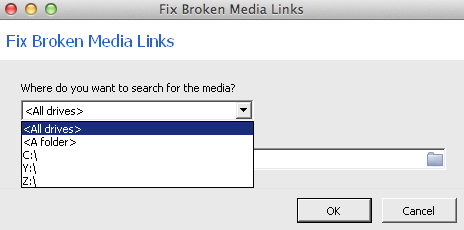
I was looking at the Media gallery and under tools, found “fix broken media links.” I found the disconcerting Windows type of file system. The prompt didn’t allow me to select any directories so search so I had to search an entire drive.  Not cool. I let it run for several hours and it seemed to have locked up. I gave up and hit cancel. It did give me the option to import what it had found thus far. Therefore, I was able to import 80 of the 133 media items that I had in Family Tree Maker for Mac. That said, I’m not positive if the 53 missing items were because of RootsMagic or because my Family Tree Maker file had already started corrupting – Probably the latter.
I adjusted the fonts and other settings to make it better for me and used it for a couple days. Roots Magic is a complicated program and I just couldn’t get the hang of it. There were times I felt like the tail was wagging the dog. That is to say, it seemed that the software was driving what I needed to do rather than my workflow being able to be documented easily by the software. Using Roots Magic really helped me understand how I like to work.
Painting by Henry Thomas Alken
[Public domain]
As I mentioned in a previous blog posting (Jump Hunting and the Maine Register), it is like jump-hunting ducks. I decide where I’m going to go hunting, go there, and “bag” the available information. Then I clean it, cook it and eat it – analyze the information, extract the information, and incorporate it into my family history. I don’t like to eat things I don’t know where they came from. Likewise, I try to have every fact, event, and story in my family history clearly documented as to the source.
The bottom line is that after a couple days of working with Roots Magic 7, I just could not learn to love it. I can definitely see why many others use it, but I just couldn’t fit my jump shooting stratagy into it’s use. Between the complexity of the software and the Windows interface, I decided to abandon my Roots Magic test and begin my search for a Family Tree Maker for Mac replacement once again.

To be continued….

[By the way, if you are interested in converting from Family Tree Maker to Roots Magic 7 , now is the time to do it with their special FTM to RM offer of only $20.]

———- DISCLAIMER ———-

Search Military Records - Fold3 Search Military Records - Fold3

Posted in Reviews | Tagged , , , | Leave a comment

Television in my family

Television in my family

Old Philips television set We did not have a television while I was growing up. I remember listening to the radio a lot when I was young. When I was in the second grade (1957), we lived in upstairs of a bakery in downtown Anoka, Minnesota. Next-door was a bar (beer joint) that had a television. Actually, they had one of the earliest color televisions. I remember my grandmother, Donna, taking me there to watch special events. I specifically remember watching the Tournament of Roses Parade and the Rose Bowl in color there. It was amazing.

We did not have our own television until I was in the fifth grade (about 1960) and were living in Spring Lake Park, Minnesota. It was a black and white TV. I remember watching morning cartoons a lot and my favorite TV show at the time was “Have Gun Will Travel.” At the time, I thought Richard Boone and my grandfather, Dick, look a lot alike. I think they had the same kind of mustache.

In 1961, my mother married Budgar and in 1962 we moved to North Minneapolis (1502 Fremont Ave No.). While there, Budgar purchased a color television. “Walt Disney’s Wonderful World of Color” and “Route 66” were my favorite television programs then (although I still loved “Have Gun Will Travel” but it was only in black and white). It was the first television I recall having a remote. I could change channels by clicking my cap gun (with a Paladin holster) – I guess TV remote was ultrasonic and the clicks of my cap gun made the TV change channels.

RCA Indian Head test pattern

About 1965, we, my mother, younger sister, and I, lived in Detroit for a short time. In Detroit, we had a weird television. Rather than the standard clicking channels, the TV had continuously tuning through the VHS band much like UHF channel selector did in those days. Between channels six and seven there were a multitude of things that could be received. FM radio stations were there along with amateur radio and some, as I recall, police/fire radio communications. It was a cool television and the only one I’ve ever seen with that type of tuner in the VHF band.

Television notes from other family members via Facebook:

My sister Glennis says: “We got our 1st TV when I was 7… an RCA Victor. For many years we only had one channel, our own local channel 4 (then an NBC affiliate.) a second channel came in a few years later when they built a repeater for the Eugene ABC affiliate. Our second TV was also Black and White. We got a Magnavox color TV when I was a senior in high school. By then, we had three channels.”

Aunt Barbara says: “I think we got our first black and white TV in about 1949/1950. It was a gift from my Uncle Bob. We loved it and him too.”

My nephew Luke says, “We had a TV already when I came along. My first memory of television was color, a little 12″ or so screen with green backlit pushbuttons down the side of the screen for channel selection and a roller wheel for volume control. It was undoubtedly a Sony. We had it in Roseburg Oregon and I remember only two channels. My mother (Glennis) had a black and white TV after the divorce, a yellow plastic housed unit with a tiny little knob on the bottom right for on/off and volume control. This was in Eugene, I remember at least three channels.”

Posted in My Memories, My History | Tagged , , , , | 1 Comment

Sarah H Blackhurst Barber (1848-unk) – My Most Recent Immigrant Ancestor

Saturday Night Genealogy Fun

Montran/Barber/Blackhurst

Sarah B Blackhurst is my most recent immigrant ancestor. Sarah was born in England, most likely in Sheffield, Yorkshire, about 1848 (I think Dec 1847). I use the 1900 Census for the basis of birthdates because it indicates the month and year of a person’s birth in addition to his or her age. In Sarah’s case, the Census reports her birth as Dec 1867 but her age as 42, which would place her as born in 1857[i]. Consequently, I only pull the month of her birth from the 1900 Census. I then use the 1850 Census, in which she is two years old, and derive a  birth date of December 1847[ii].

The 1920 Census shows Sarah Blackhurst Barber’s arrival in 1850.
The 1850 Census also indicates that she was born in England and living in Detroit at the age 2 indicating an arrival before June 1850.  Additionally, the 1920 Census indicates the date of her arrival as 1850[iii], so, I’m fairly sure of that she arrived in 1850.  I haven’t found the family arriving in the United States in any immigration documents, so far but will continue searching.
Seventy-year-old Sarah is enumerated in the 1920 Census living in Manhattan, New York, New York[iv]. I have been unsuccessful finding a death record for Sarah thus far.

Further Action:

Find Sarah and family in immigration documents.

Endnotes

[i] 1900 Census (National Archives and Records Administration), Ancestry, https://www.Ancestry.com, Year: 1900; Census Place: Detroit Ward 4, Wayne, Michigan; Roll: T623_748; Page: 13B; Enumeration District: 36.
[ii] 1850 United States Federal Census, Family Search, Stephen Blackhurst – Auburn county, ward 4, Cayuga, New York, United States; citing family 1389, NARA microfilm publication M432 (Washington, D.C.: National Archives and Records Administration, n.d.). Accessed 24 November 2015. https://beta.familysearch.org/ark:/61903/1:1:MCT2-GRX.
[iii] 1920 Census, Ancestry, https://www.Ancestry.com, Manhattan Assembly District 13, New York, New York; Roll: T625_1209; Page: 24A; Enumeration District: 958;
[iv] 1920 Census, Ancestry, https://www.Ancestry.com, Manhattan Assembly District 13, New York, New York; Roll: T625_1209; Page: 24A; Enumeration District: 958; Image:.
Randall J. Seaver, in his blog Genea-Musings, suggested this topic.

————-  DISCLAIMER  ————-

Posted in Brown-Montran | Tagged , , , , | 2 Comments